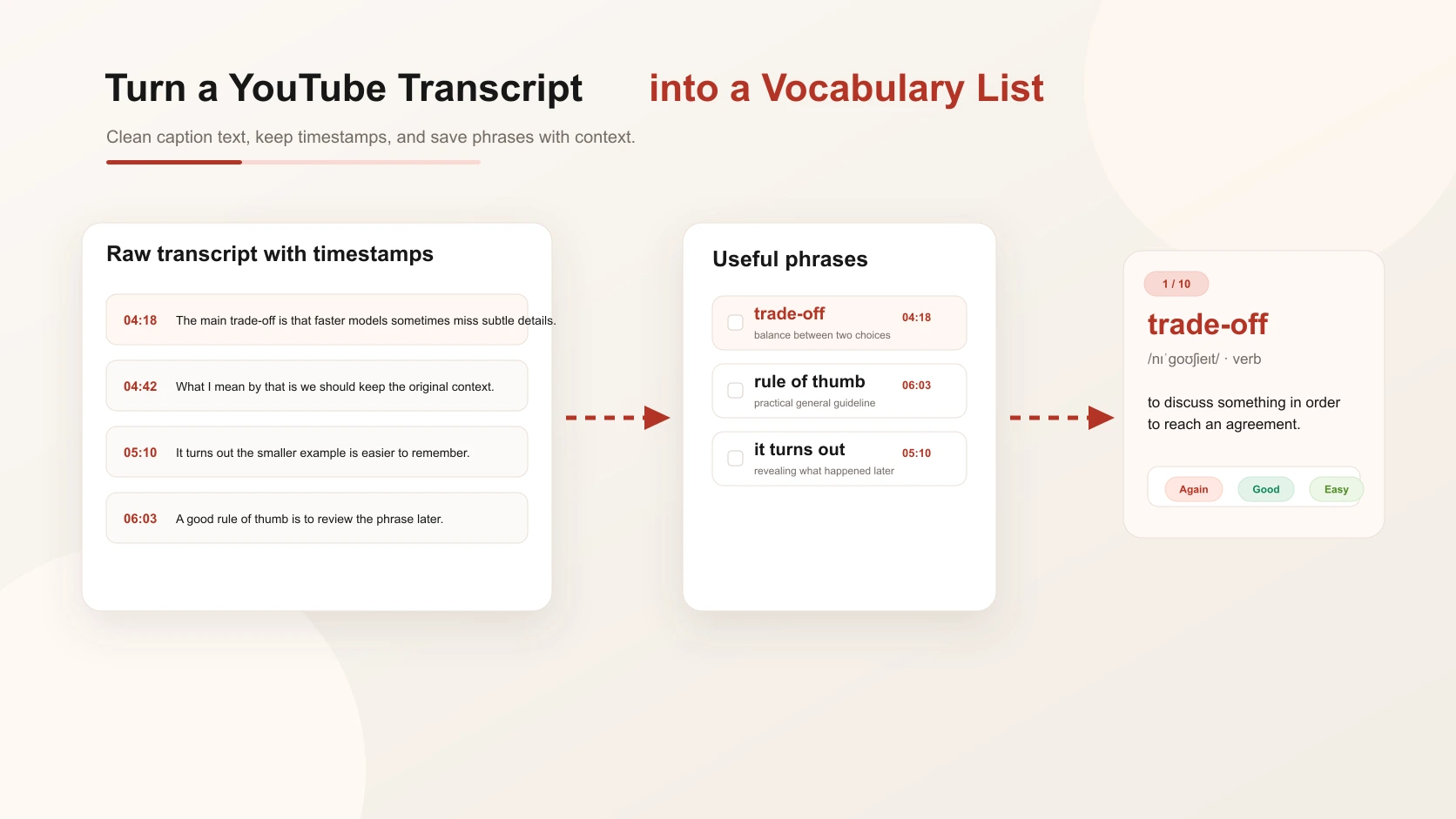
A YouTube transcript can look like a wall of text. It may include repeated phrases, broken captions, missing punctuation, speaker mistakes, timestamps, and lines that only make sense when you hear the tone. But inside that messy text, there is often excellent vocabulary: natural phrases, topic-specific terms, transitions, collocations, and examples you would not find in a textbook.
The trick is not to copy the whole transcript. The trick is to turn a YouTube transcript into a vocabulary list that you can review without losing the original context.
Start with the Transcript, Not the Video
This guide is for the moment after you already have the transcript. Maybe you copied it from YouTube. Maybe you exported captions. Maybe you used a transcript tool. However you got it, your next job is to turn raw text into learning material. Raw transcript text is not ready for vocabulary review. It often includes:
- repeated greetings and filler;
- auto-caption mistakes;
- missing punctuation;
- incomplete sentences;
- sponsor messages;
- words that are clear in audio but confusing in text;
- topic shifts that need timestamps.
If you save vocabulary from that text too quickly, your list becomes noisy. You may end up reviewing words that were only useful once, or you may lose the sentence that made the phrase meaningful.
Step 1: Clean the Transcript Lightly
Do not over-edit the transcript. You are not preparing a published article. You only need the text to be readable enough for vocabulary selection.
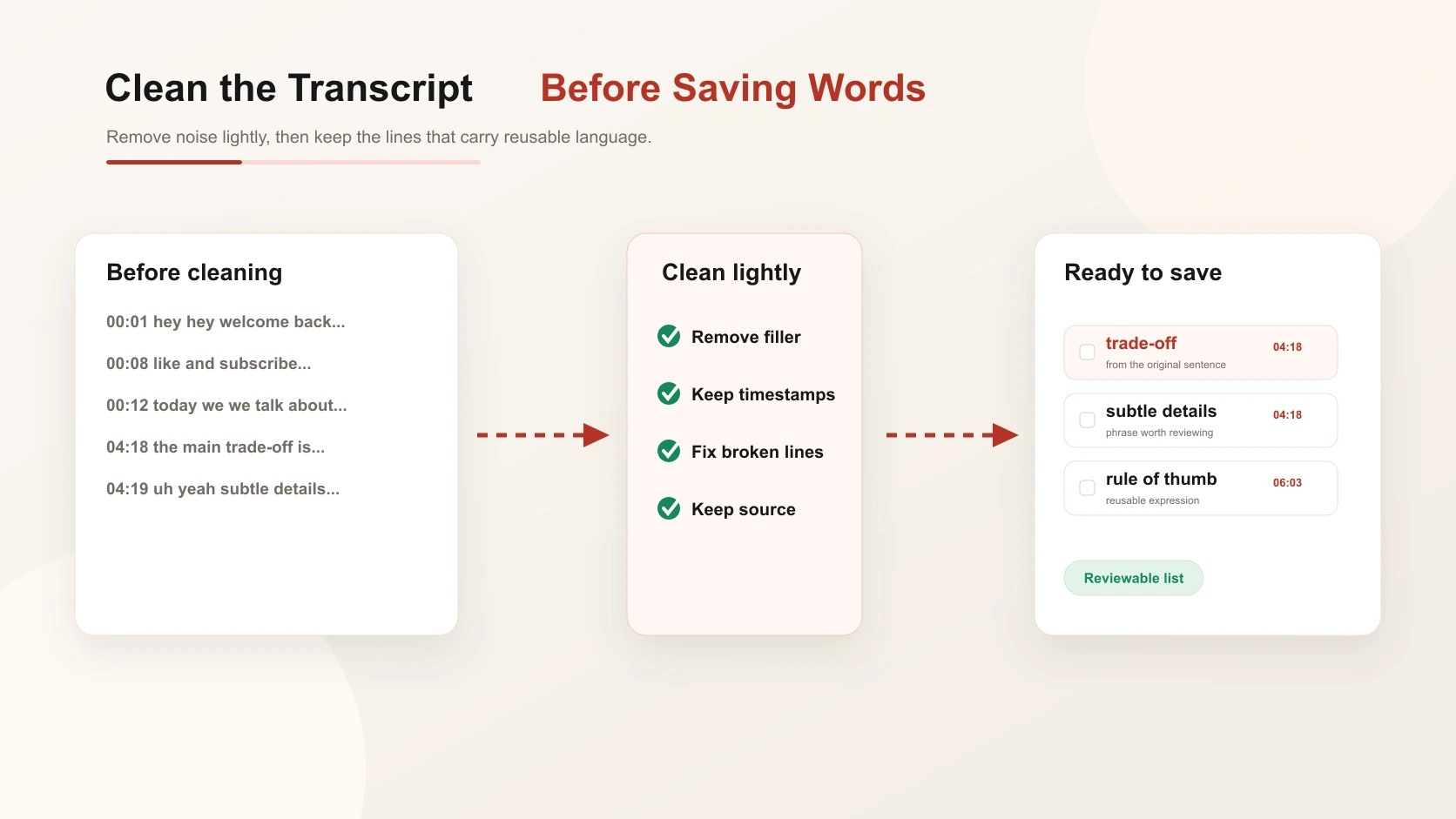
Start by removing obvious noise:
- intro lines you do not need;
- repeated "like and subscribe" sections;
- broken caption fragments;
- ad reads or sponsor blocks;
- repeated words caused by caption errors.
Then divide the transcript into small sections. If timestamps are available, keep them. A timestamp is valuable because it lets you replay the exact moment where the word appeared. That matters for pronunciation, emphasis, and spoken rhythm.
04:18 - "The main trade-off is that faster models sometimes miss subtle details."
From this one line, "trade-off," "subtle details," and "miss details" may all be useful, depending on your level and goal.
Step 2: Choose Phrases, Not Only Single Words
When you turn a YouTube transcript into a vocabulary list, single words are only part of the value. Spoken language is full of reusable chunks. Instead of saving only "subtle," you might save:
- subtle details;
- miss subtle details;
- the main trade-off is;
- in real-world use;
- that depends on;
- what I mean by that is.
These phrases help you speak and write more naturally. They also preserve how the speaker actually used the word. Your selection should depend on your goal. If you are learning English for work, save professional phrases. If you are watching science videos, save technical terms. If you are watching interviews, save conversational expressions.
Step 3: Keep the Timestamp and Source Sentence
A weak transcript vocabulary note looks like this:
trade-off - balance
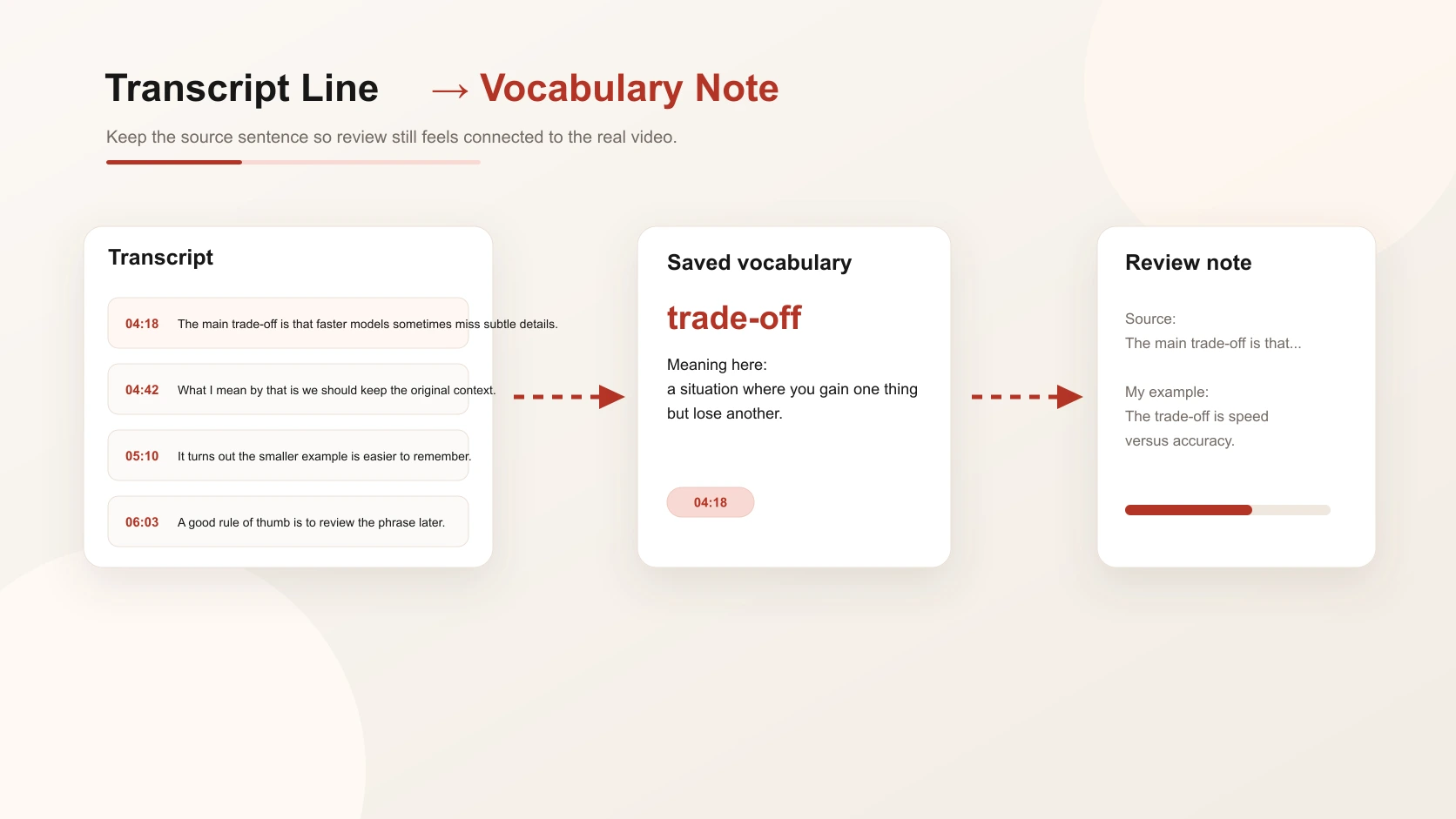
A useful note looks like this:
trade-off - a situation where you gain one thing but lose another.
Source: "The main trade-off is that faster models sometimes miss subtle details."
Timestamp: 04:18
My example: The trade-off is speed versus accuracy.
The timestamp gives you a path back to the video. The source sentence shows the word in use. Your own example helps move the word from recognition into production. This is also where a tool like ClaviSay can fit into the workflow, because the point is to keep saved vocabulary tied to the real content that produced it.
Step 4: Add Meaning in This Context
Do not write every possible dictionary meaning. A transcript vocabulary list should explain the meaning that fits this line. For example, "run" can mean manage, operate, move quickly, flow, or continue. If the speaker says, "I ran into the same problem," the meaning is "experienced or encountered," not "moved quickly." Context-first definitions are shorter and easier to review:
- "ran into a problem" - encountered a problem unexpectedly;
- "break down the idea" - explain it in smaller parts;
- "it turns out" - used when revealing what was discovered later;
- "rule of thumb" - a practical general guideline.
This is the main reason transcript vocabulary can be powerful. It captures language as people actually use it.
Step 5: Build a Reviewable List
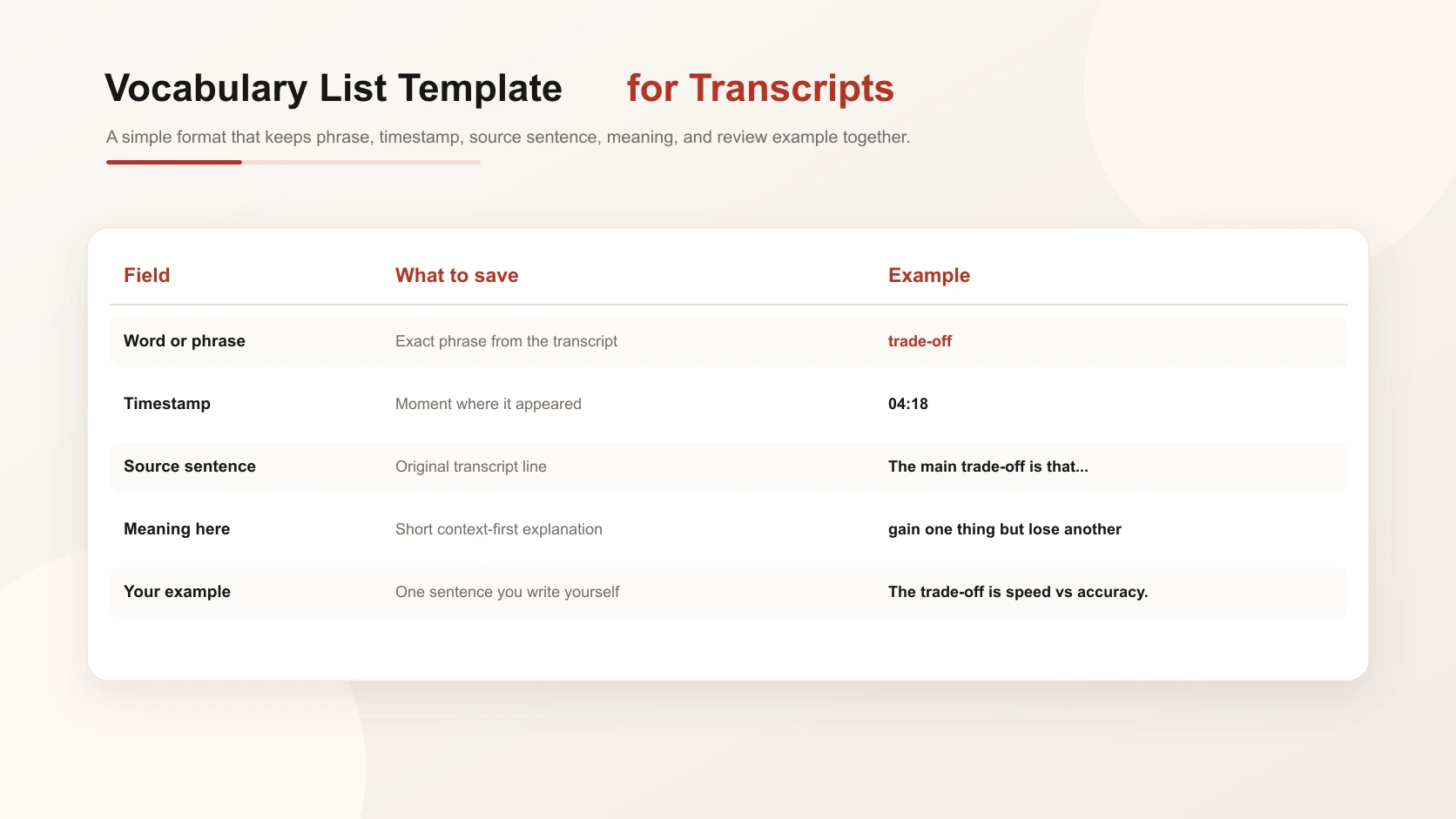
Use a simple structure:
This format keeps the list useful. It gives you enough context to remember the phrase, but not so much information that review becomes heavy. Try to limit one video transcript to 10-25 vocabulary items. If you save more, split them by topic or review difficulty.
Step 6: Review Without Rewatching the Whole Video
You do not need to rewatch the full video every time. Use the transcript list first. If a word feels unclear, replay only the timestamp. A good review session might look like this:
- Read the phrase.
- Cover the meaning.
- Try to remember the transcript sentence.
- Write your own sentence.
- Replay the timestamp only if needed.
This keeps review short and focused. It also prevents the common trap of "studying" by rewatching videos passively.
Common Mistakes
Do not save every unknown word. Some words are rare, off-topic, or not useful for your goals.
Do not remove all spoken features. Fillers and informal phrasing can teach you how people actually talk.
Do not ignore timestamps. They make the list much more useful for listening and pronunciation.
Do not treat transcript text as perfect. Auto-captions can be wrong, especially with names, technical terms, and fast speech.
A Simple Transcript Vocabulary List Template
If you are building the list by hand, keep each entry small: phrase, source sentence, timestamp, short meaning, and your own example. If you want a broader product flow, the Vocabulary Builder page explains how source content and saved vocabulary can stay connected over time.
Final Thoughts
The best way to turn a YouTube transcript into a vocabulary list is to keep the transcript's strongest advantage: real spoken context. Clean the text lightly, choose useful words and phrases, keep timestamps, save the source sentence, and add your own example.
If you want the broader video workflow, read How to Build Vocabulary from a YouTube Video. If you want a feature page for the workflow, see YouTube to vocabulary. You can also compare this with create vocabulary list from text or return to turn a YouTube transcript into a vocabulary list for the transcript-specific version.
FAQ
How do I turn a YouTube transcript into a vocabulary list?
Clean the transcript, select useful words and phrases, keep timestamps and source sentences, add short meanings, and write your own review examples.
Should I save single words or phrases from a transcript?
Save both, but phrases are often more useful because they show how words work in natural speech.
Why are timestamps important?
Timestamps let you replay the exact moment where the word appeared, which helps with pronunciation, tone, and context.
How many vocabulary items should I save from one transcript?
For most videos, 10-25 strong items are better than a long list you will not review.